
INTRODUCTION & KEY CHALLENGES
An Essential Automation Component
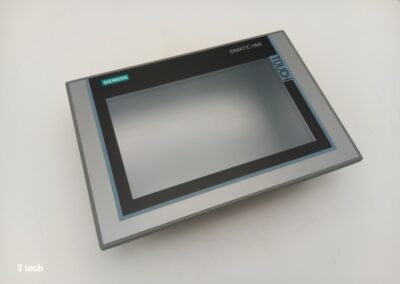
The Siemens TP1200 touchscreen is an essential component of modern industrial automation systems. This sophisticated human-machine interface (HMI) enables operators to control and monitor production processes with precision.
Major Failure Risks
The reliability of this equipment is crucial to maintaining productivity. A touchscreen failure can lead to:
- Costly production stoppages
- Major data loss
- Manufacturing delays and safety risks
TROUBLESHOOTING MALFUNCTIONS
Accurately identifying TP1200 touchscreen malfunctions is a critical step for a successful repair. The most common issues present in different ways:
Visual Symptoms
- Completely black screen
- Partial or pixelated display
- Interference lines on the screen
- Backlight failure
Touch issues
- No reaction to touch
- Phantom contact points
- Dead zones on the screen
Systematic Checks
The reliability of this equipment is crucial to maintaining productivity. A touchscreen failure can lead to:
- Power supply test
- Examination of internal connections
- Analysis of codes & firmware
Visual Symptoms
- Completely black screen
- Partial or pixelated display
- Interference lines on the screen
- Backlight failure
Touch issues
- No reaction to touch
- Phantom contact points
- Dead zones on the screen
Systematic Checks
The reliability of this equipment is crucial to maintaining productivity. A touchscreen failure can lead to:
- Power supply test
- Examination of internal connections
- Analysis of codes & firmware
Step 1
DISASSEMBLING THE HMI PANEL
Materials required:
- Phillips screwdriver
- Flat screwdriver
- Antistatic wristband
- Clean, flat work surface
- Container for screws
Key steps:
Preparation
- Disconnect all power supplies
- Put on the antistatic wristband
- Photograph connections for reference
⚠️ Precautions: Never force components; handle only by the edges
Step 2
REPLACING THE TOUCHSCREEN
Removing the old screen
-
Carefully disconnect the connectors linking the screen to the motherboard.
-
Remove the mounting screws located at the four corners of the screen.
-
Gently lift the faulty screen, avoiding any twisting.
Specifications & Compatibility
-
Selecting the new screen must meet the original criteria:
- 1280 x 800 pixels
- 308 x 204 mm
- TFT LCD panel
- Siemens-certified
Step 3
POST-REPAIR CALIBRATION
Post-repair calibration is an essential step to ensure the accuracy and responsiveness of the Siemens TP1200 touchscreen.
A poorly calibrated screen can lead to:
- Cursor positioning errors
- Inadequate tactile sensitivity
- Dead zones on the screen
- Unrecognized orders
Standard calibration procedure :
Calibration requires particular attention to the sensitivity settings. An optimal adjustment helps prevent unintended operations while maintaining appropriate responsiveness for the industrial environment.
Step 4
Essential technical checks: Profinet connection and critical technical details
Checking the Profinet connection is a critical step after repairing the Siemens TP1200 touchscreen. Accurate network configuration ensures smooth communication between the HMI interface and the PLC.
IP address configuration
Profinet communication test
Additional control points
Profinet connection stability directly impacts TP1200 performance. An in-depth diagnosis of network settings helps quickly identify potential anomalies and optimize operation of the installation.
Step 5
Contact a qualified technician in the event of complex issues with the TP1200
Some Siemens TP1200 failures require the expertise of a specialized technician. The following situations require professional intervention:
Complex hardware problems
- Motherboard failure
- Internal short circuit
- Extensive physical damage to components
- Backlight malfunction
- Persistent communication problems with the PLC
Benefits of specialized technical support
Qualified technicians have specific training on Siemens equipment and are proficient in maintenance protocols. Their expertise helps prevent handling errors that could worsen existing issues.
A certified professional also has the necessary licenses to access Siemens proprietary software and perform the required system updates. This expertise ensures a durable repair that complies with the manufacturer’s standards.
The complexity of industrial automation systems justifies investing in professional intervention to maintain the reliability and performance of your TP1200 equipment.
Conclusion: the importance of preventive maintenance to ensure the longevity of Siemens TP1200 touchscreens.
Repairing a Siemens TP1200 touchscreen requires a methodical and precise approach.
The essential steps include:
Regular preventive maintenance is essential to extend the service life of your equipment. Recommended actions include:
To see these procedures in action, we invite you to watch our detailed video on the 2 TECH YouTube channel. This practical demonstration will guide you step by step through the maintenance and repair process for your Siemens TP1200 touchscreen.
Frequently asked questions
What are the common issues encountered with the Siemens TP1200 touchscreen?
Common issues include a black screen, no response to touch, and other malfunctions. A proper diagnosis is essential before proceeding with repairs.
How do I safely remove the HMI panel from the TP1200?
To disassemble the TP1200 HMI panel, first remove the front cover and disconnect the internal cables, taking care to follow the detailed steps to avoid damaging the device.
How do I replace a faulty touchscreen on a Siemens TP1200?
The replacement process includes removing the old screen and installing a compatible new screen. It is crucial to choose a replacement screen that meets the essential criteria to ensure optimal operation.
Why is post-repair calibration important for the TP1200 touchscreen?
Post-repair calibration is crucial to ensure that the human-machine interface functions correctly after the screen is replaced. This includes specific steps to calibrate the touchscreen.
What technical checks should be carried out after repairing the TP1200?
After the repair, it is important to check the Profinet connection between the HMI and the PLC, as well as other technical details such as the IP address, to ensure everything is working correctly.
When should I call a qualified technician to repair my TP1200?
It is recommended to consult a qualified technician if you encounter complex issues that cannot be resolved with simple repairs. Specialized technical support can prevent further damage.